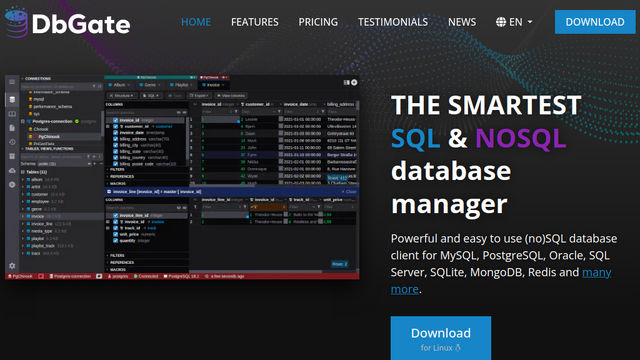
DbGate is an open-source, cross-platform database management tool designed to be simple, fast, and extensible. It supports a wide variety of SQL and NoSQL databases, including MySQL, PostgreSQL, SQL Server, MongoDB, and Redis. Unlike many heavy-duty database clients, DbGate offers a lightweight footprint and can be run as a desktop application for Windows, Linux, and macOS, or as a web-based application through a Docker container, providing a consistent experience across different operating environments.
Use Cases
Multi-Engine Database Management
Manage diverse database types like PostgreSQL, MySQL, and MongoDB within a single, unified interface.
Database Schema Comparison
Compare the structures of two databases and generate synchronization scripts to align development and production environments.
Visual Data Exploration
Browse large datasets using powerful filtering, sorting, and form view options to inspect individual records easily.
Query Building for Non-SQL Users
Utilize the visual query designer to build complex data lookups without manually writing SQL code.
Remote Database Administration
Deploy DbGate as a web-based client via Docker to provide secure, browser-based database access for remote teams.
Features & Benefits
Broad Database Support
Native support for SQL engines (MySQL, Postgres, SQL Server, SQLite) and NoSQL engines (MongoDB, Redis).
Cross-Platform Flexibility
Operates as a native desktop application or a web-based client, ensuring accessibility on any device.
Powerful Query Editor
Features a professional-grade SQL editor with autocomplete, syntax highlighting, and execution history.
Extensible Plugin System
Allows developers to create and install plugins to support new database drivers or custom interface themes.
Import and Export Wizards
Easily migrate data between formats and databases, including support for CSV, JSON, and Excel files.