Workflow Builder | Embed a production-ready workflow editor in your React app
Workflow Builder
Introduction
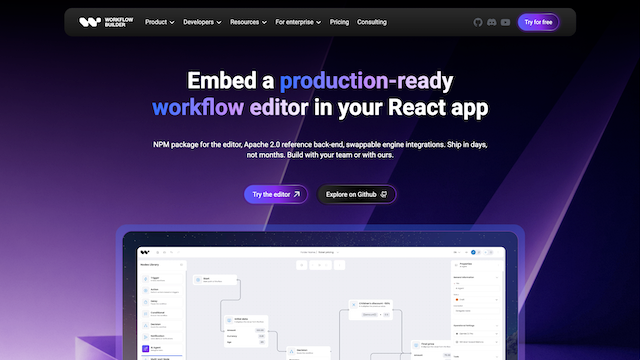
Workflow Builder is an embeddable React SDK and developer toolkit designed to integrate a production-ready, interactive workflow canvas directly into B2B SaaS applications. Unlike standalone automation platforms (such as n8n or Make) or bare-bones canvas libraries (such as raw React Flow or D3), Workflow Builder provides a complete, polished UI layer—including schema-driven properties panels, smart edge routing, ELK auto-layout, and JSON serialization. Paired with an Apache 2.0 reference backend and swappable execution engine ports (with native adapters for Temporal and LangGraph), it enables engineering teams to ship embedded customer-facing AI agent chains, marketing journeys, IVR call flows, or approval automations in days rather than spending 14–25 weeks building canvas plumbing from scratch.
Use Cases
Embedded AI Agent & Chain Authoring
Provide end users with an in-app visual drag-and-drop canvas to configure multi-step AI agent workflows, prompt chains, memory buffers, and tool calling pipelines on top of LangGraph or custom runtimes.
White-Labeled Customer Automation Workflows
Embed native workflow automation inside B2B SaaS platforms (e.g., automated email/SMS marketing journeys, approval routings, conditional branch triggers) under your own brand and design system.
Visual UI for Durable Execution Engines
Serve as the visual authoring frontend for distributed execution engines like Temporal, translating user-drawn node graphs into deterministic backend workflows.
Domain-Specific Configurators & Decision Trees
Build interactive logic editors for complex domains—such as IVR call routing trees, healthcare clinical protocols, or industrial parameter pipelines.
Human-in-the-Loop Review & Audit Views
Utilize read-only canvas modes to render live execution paths, intervention checkpoints, and historical step-by-step audit traces for operational oversight.
Features & Benefits
Drop-In React Editor SDK
Pre-built, high-performance canvas component handling pan, zoom, marquee selection, copy/paste, and undo/redo optimized for 500+ nodes.
Schema-Driven Properties Panel
Generates fully typed, validated configuration forms automatically from TypeScript and JSON Schema definitions without manual form component coding.
Smart Edge Routing & Interactive Reshaping
Advanced layout algorithms that prevent overlapping edge paths, complete with waypoint drag handles for intuitive visual graph restructuring.
Engine-Agnostic Reference Backend (Apache 2.0)
Open-source reference HTTP API, graph runner, and engine-port abstractions ready to clone and integrate with any execution orchestrator.
Swappable Execution Engine Adapters
Pre-built adapter architecture with out-of-the-box support for Temporal and LangGraph, allowing modular backend orchestration.
Unified Design System & Figma Sync
Comprehensive design tokens (colors, typography, radii, dark/light themes) mirrored directly between code components and enterprise Figma kits.
Saves 3–6 Months of Engineering Time
Eliminates the immense friction of building edge routing, auto-layout, zoom mechanics, and schema panels on top of basic node libraries.
Complete Data & Brand Sovereignty
Unlike embedding third-party SaaS iframes (n8n, Zapier), you own the entire UX, authentication layer, telemetry, and backend execution runtime.
Permissive Open-Source Foundation
Community Edition provides an Apache 2.0 licensed core backend and UI stack with no copyleft restrictions, commercial use approval, and full white-label rights.
Cons
Requires Existing React & Web Architecture
Built specifically as a React SDK, meaning teams utilizing non-React frontends must integrate via micro-frontends or web components.
Enterprise License for Advanced Canvas Plugins
While the community core is free, proprietary advanced plugins (such as interactive edge reshaping, proprietary ELK layouts, and full Figma tokens) require a one-time enterprise license (€6,990).