OpenMontage | The Open-Source Agentic Video Production Studio
OpenMontage
Introduction
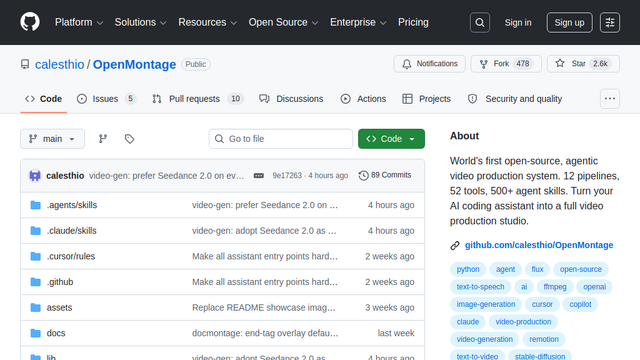
OpenMontage is the world’s first open-source, agentic video production system designed to turn AI coding assistants (like Claude Code, Cursor, or Windsurf) into full-scale multimedia studios. Rather than just animating a handful of images, it utilizes a multi-stage, pipeline-driven workflow—handling everything from live web research and scripting to asset generation, music selection, and final timeline composition. It acts as an orchestrator for over 50 tools, allowing an AI agent to direct a complete cinematic production or documentary edit autonomously.
Use Cases
Reference Video Cloning
Paste a YouTube URL or TikTok link; the agent analyzes the pacing, transcript, and style to generate a differentiated production plan and cost estimate before starting.
Documentary & Stock Edits
Automatically research a topic, build a corpus from free stock footage and open archives, and edit it into a narrated timeline for $0.
Talking Head Social Videos
Turn raw talking-head footage into polished, edited social media content with auto-subtitles, pacing adjustments, and b-roll inserts.
Code & Terminal Demos
Use ‘Synthetic Screen Recording’ to render perfect, high-fidelity terminal demos or UI walkthroughs programmatically via Remotion.
Green Screen Compositing
Run an automated pipeline that handles AI keying, generates animated background replacements, and auto-composites the final shot.
Features & Benefits
12 Pipelines & 52 Tools
Deep integration with over 8 image providers, 4 TTS engines, and 12 video generators (including Seedance 2.0, Kling 2.6, Runway, and Google Imagen).
Hybrid Local/Cloud Support
Run everything entirely offline for free using local GPU models (FLUX, WAN 2.1, Stable Diffusion, Piper TTS) or plug in premium cloud APIs.
Multi-Point Self-Review
The agent validates its own work using ffprobe, frame sampling, and audio level analysis before presenting a draft.
Sample-Before-Batch
Generates low-cost samples and requires explicit human approval at key creative gates to prevent wasting API budgets on long renders.
Dual Render Engines
Composes final videos using advanced programmatic video frameworks like Remotion and HyperFrames.
True Production Workflow
Moves beyond the ‘text-to-video’ slot machine by structuring generation into a professional timeline (script -> storyboard -> assets -> composition).
Cost Flexibility
The ability to mix-and-match local open-weights with cloud APIs means you can scale production quality perfectly to your budget.
Highly Extensible
As an open-source Python/Node.js framework, developers can easily plug in new AI models or custom FFmpeg scripts.
Cons
Requires an AI CLI/IDE
It does not have a standalone point-and-click web GUI; it must be driven by an AI coding assistant like Claude Code or Cursor.
Technical Setup
Requires installing Python, Node.js, and FFmpeg, plus managing multiple API keys or complex local GPU environments for offline use.